Offline Conversion Tracking The Easy Way.

Capture form submissions, attribute leads to their sources, and upload offline conversions to Google Ads. All with a simple tracking snippet.

View Demo

Secure checkout • Setup in 5 minutes

FormTrackr Demo

Track qualified leads. Push real conversions.

You know the drill: Google Ads says you got 47 conversions this month. Your spreadsheet says 12 of them were actually worth talking to. And maybe 3 closed.

So what's Google optimizing for? The 47. Which means your campaigns keep chasing more of the same junk leads while your cost per *actual customer* climbs into the stratosphere.

The problem isn't your forms. It's what happens after someone fills them out. Google Ads has no idea which leads are tire-kickers and which ones are writing checks. You're stuck cobbling together GCLID workarounds, wrestling with CSV imports that break half the time, and watching your "offline conversions" error out for reasons Google will never fully explain.

Your CRM? It tracks your sales process beautifully. But it wasn't built to talk back to Google Ads. So the feedback loop that's supposed to make Smart Bidding actually smart? It doesn't exist.

Here's what you actually need:

Every lead that comes in should show up with the full story. UTMs, GCLID, referrer, landing page, the works. You need to see it instantly, mark whether it's qualified or garbage, add notes about what happened on the call (or why you ignored it), and log the deal value when it closes.

Then (and this is the part that actually matters) that data needs to flow back to Google Ads automatically. Not as a monthly CSV dump you upload when you remember. Not as a half-broken Zapier chain. Automatically. So Smart Bidding stops optimizing for form fills and starts optimizing for leads that turn into revenue.

When your campaigns learn from real outcomes, everything changes. Your CPAs might even go *up* at first, but your cost per qualified lead drops, your close rate improves, and suddenly you're profitable again.

Setting up Google Ads Offline Conversion Tracking with FormTrackr is a simple 4-step process!

  1. Installing FormTrackr script
  2. Integrating your web form with FormTrackr
  3. Connect Google Ads
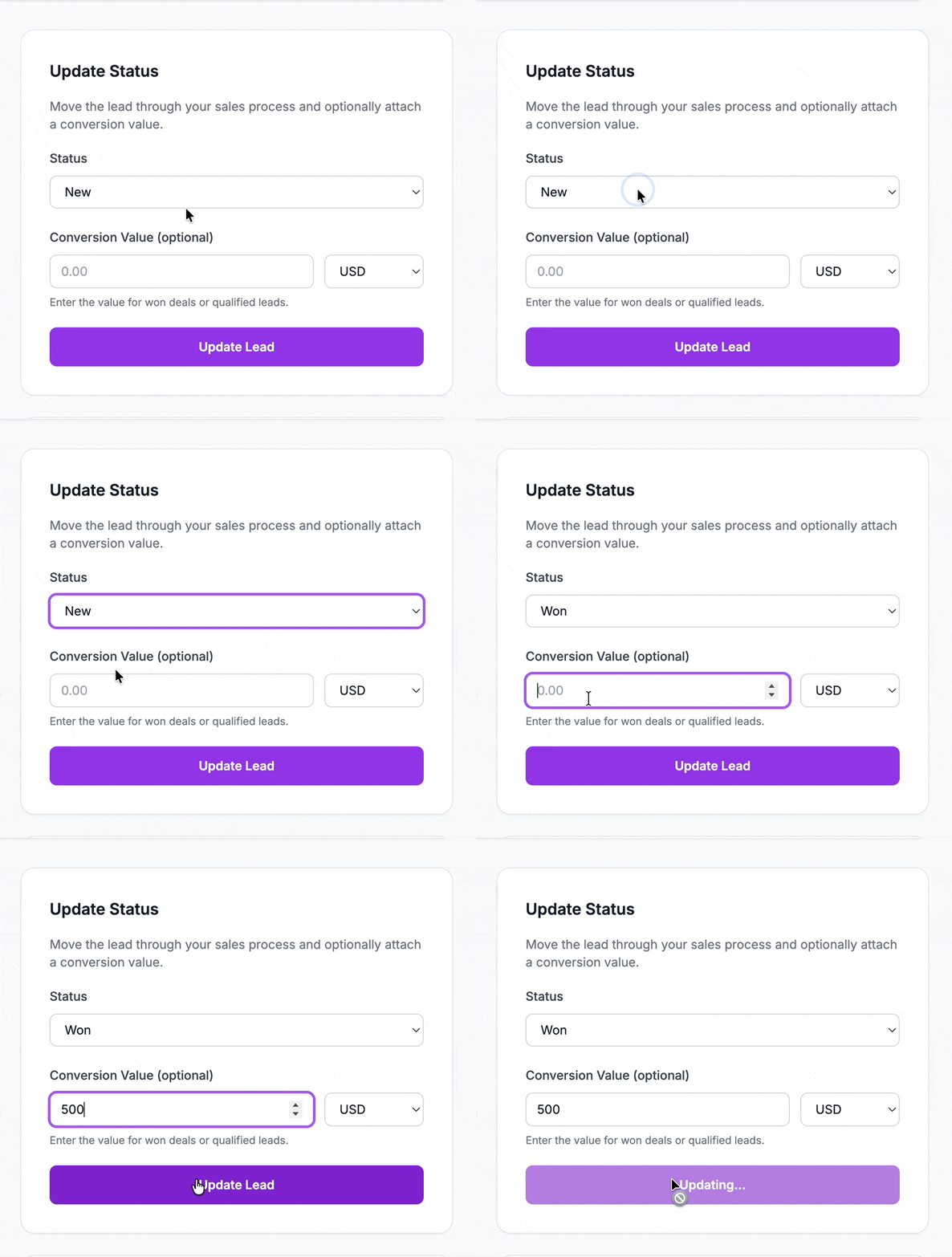
  4. Mark leads as MQL, or WON in the dashboard.

See our demo video to see how easy FormTrackr makes it!

That's exactly what FormTrackr does.

Think of it as the layer that sits between your ads and your CRM. Catching leads, organizing them, and feeding the good ones back to Google so your campaigns get smarter.

Drop our tracking snippet on your site (works with any HTML form, no iframe headaches), and every lead shows up in a clean dashboard. Mark the status: new, pending, qualified, won. Add notes about the conversation. Log the deal value. FormTrackr handles the offline conversion upload to Google Ads for you. Reliably. No CSV wrestling, no GCLID paranoia, no "why didn't this upload?" panic.

When a lead turns into a customer and you're ready to move them into your full CRM, hand them off. FormTrackr isn't trying to replace your CRM. It's the bridge that makes your ads actually learn from what happens after the click.

Works with any HTML form. For the smoothest possible setup, we recommend working with our API. For more info on how to build landing pages with NextJS and work with APIs, please visit https://freak.marketing/ai-powered-landing-pages

Setup takes 5 minutes. $30/month. Cancel anytime.

FormTrackr: Track every lead. Know every source. Optimize for outcomes.

Frequently Asked Questions

Do you offer Google Ads Enhanced Conversions functionality?

Yes! FormTrackr supports Google Ads Enhanced Conversions. When enabled, we automatically hash email addresses and phone numbers using SHA-256 before sending them to Google Ads. This improves conversion attribution accuracy, especially for cross-device conversions, while maintaining user privacy. Enhanced Conversions work alongside GCLID tracking to maximize match rates. You can enable this feature in your Google Ads integration settings, and you'll need to configure it in your Google Ads account as well (Goals → Settings → Enhanced conversions for leads).

Does FormTrackr sync with my CRM?

Yes! FormTrackr integrates with Zapier, allowing you to automatically sync won leads to your CRM. When you mark a lead as "WON" with a conversion value in FormTrackr, it automatically sends the lead data to your Zapier webhook. You can then use Zapier to push this data to your CRM (Salesforce, HubSpot, Pipedrive, or any other CRM that Zapier supports). Simply configure your Zapier webhook URL in the Integrations section of your project settings, and FormTrackr will handle the rest automatically.

What forms does FormTrackr work with?

FormTrackr works with any standard HTML form on your website. Our lightweight JavaScript snippet automatically detects and tracks form submissions without requiring code changes. You can use automatic mode to track all forms on specified pages, or manual mode to target specific forms by ID. It works with contact forms, lead gen forms, newsletter signups, quote requests, and more.

What attribution data does FormTrackr track?

FormTrackr captures comprehensive attribution data including UTM parameters (source, medium, campaign, term, content), Google Click ID (GCLID) for Google Ads tracking, referrer URLs, landing pages, and the page where the form was submitted. This gives you complete visibility into where your leads are coming from and helps you optimize your marketing spend.

How difficult is it to set up?

Setup takes about 5 minutes. Simply copy our tracking snippet and paste it before the closing </body> tag on your website. Our guided onboarding walks you through configuring form tracking and connecting your Google Ads account. No coding knowledge required—if you can copy and paste, you can use FormTrackr.

Is FormTrackr privacy compliant?

Yes. FormTrackr is built with privacy in mind. We respect user consent flags, hash IP addresses, filter sensitive fields like passwords, and when Enhanced Conversions is enabled, all personal data is hashed using SHA-256 before being sent to Google Ads. You have full control over what data is collected, and we're transparent about our data handling practices.

Can I track multiple websites or projects?

Absolutely! FormTrackr supports unlimited projects, so you can track leads from multiple websites, campaigns, or brands. Each project gets its own unique tracking snippet and dashboard, allowing you to keep your data organized and analyze performance separately.

How do I know if conversions are uploading to Google Ads correctly?

FormTrackr provides detailed upload logs for every conversion attempt. In your dashboard, you can see the status of each upload (successful, failed, or pending), view error messages if something goes wrong, and check timestamps to verify when conversions were sent. You can also verify conversions in your Google Ads account to ensure they're being received correctly.

Can I use FormTrackr alongside Google Tag Manager or other tracking tools?

Yes, FormTrackr works independently and won't interfere with other tracking tools. Since we upload conversions via the Google Ads API rather than using tags, we don't conflict with Google Tag Manager, Google Analytics, or other marketing tools. Many customers use FormTrackr specifically for offline conversion tracking while keeping their existing tag setup intact.